Displaying and Printing Microsoft Word Paragraph Styles
While fooling around in Microsoft Word to work up something for the Broward Personal Computer Association, Inc. (BPCA) Word Processing Special Interest Group (SIG), I ran across how to display paragraph styles and how to print a listing of paragraph styles with their formatting.
Displaying
First lets deal with displaying the paragraph styles. Displaying the paragraph styles is only available in Normal view, as far as I can tell. I did try the other layouts. If anyone knows of a way to do the same in the other layouts, please let me know.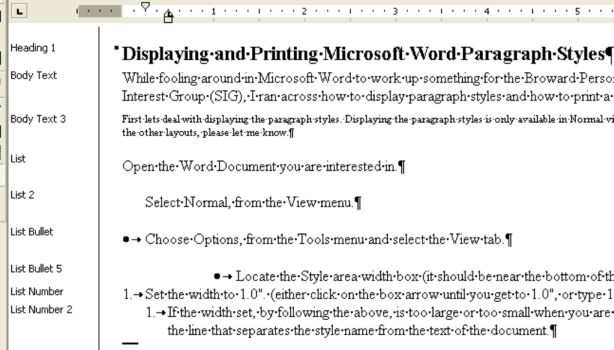
Printing
Sometimes it is useful to print out the paragraph styles and their formatting. I frequently do this when I am trying to set up a template for a project, so that I can consistently apply paragraph formatting throughout the document.Typically, I use very few styles but, the styles I do use are used consistently.
You can print out a list of the styles used in a doument by selecting Styles in the Print What section of the Print Dialog Box:

In my opinion, the use of styles is very important. Styles promote consistency and make documents much easier to edit.
More on using Styles to follow in future postings.


 Posts
Posts


Hi there,
ReplyDeleteI enjoy printing a lot, I spend most my time printing labels, as I had a great deal from a british labels company on some plain labels.
Hi,
ReplyDeleteThis is a nice post.
It is informative and useful.
I have used this and enjoyed the printing.
In my experience, selecting Print what = Styles in the Print dialog box, prints all the styles defined in the document, whether they are in use (applied to text) or not. I am sitll looking for a way to report only the styles in use.
ReplyDeleteSusan,
ReplyDeleteThis post was for MS Word 2000 and 2003, I do not know if there is a way to print out only the styles in use in 2007, but I know in 2000 and 2003 it does print out all the styles in the document.
The only way I can think of to work around, is to set up a template using only the styles you want for the document.
Good post and this post helped me alot in my college assignement. Say thank you you on your information.
ReplyDeleteFor me ms word are quite important tool,because of there are a lot of doc files on my PC. Several days ago something happened with my doc file and I didn't know what to do next. For luck a friend called me up and told me about many nice tools. I used one of them and was glad,reason of the utility helped him - doc recovery. My trouble was solved very easy and for free as I kept in mind.
ReplyDeleteSorry for my bad english. Thank you so much for your good post. Your post helped me in my college assignment, If you can provide me more details please email me.
ReplyDeleteCouple days ago I was at the Inet and caught sight there - how can repair word. It astonished me for seconds, because of the utility restored my emails quite rapidly and free of charge. It assisted my friend.
ReplyDelete