Showing posts with label Miscellaneous. Show all posts
Showing posts with label Miscellaneous. Show all posts
Wednesday, March 10, 2010

Thursday, February 25, 2010
The Story of a Sign
via youtube.com
Was referred to this video via a comment on Creative Copy Challenge #18:
http://www.creativecopychallenge.com/creative-copy-challenge-18/comment-page-1/#comment-1773
This is a very moving video, that shows how words really do matter.
Enjoy, and thank you Shane Arthur.
Thursday, February 11, 2010
Four Technology Tips Feeds to Check Out
The list that follows contains some of my favorite Google Reader geeky tips feeds (not necessarily MS Windows only).
Check them out and let me know what you think.
TinyHacker
Site: http://tinyhacker.com/Feed: http://feeds.howtogeek.com/tinyhacker
This is part of the How-To Geek network http://www.howtogeek.com/, which has been mentioned here numerous times before. The difference is that TinyHacker shows only a very short tip summary, with a link to a more in depth posting.
Usually has several posts each day.
I usually check this feed every other day or so, to see if there is anything interesting.
Online Tech Tips
Site: http://www.online-tech-tips.comFeed: http://www.online-tech-tips.com/feed/
"Welcome to Online Tech Tips – a blog that provides useful computer tips in an easy to understand format."
In my experience the above tag line contains the essence of why it should be added to everyone's favorite tips feed list.
Usually one or two posts each day.
FriedBeef’s Tech
Site: http://www.friedbeef.comFeed: http://www.friedbeef.com/category/useful-tips/feed
The feed shown above is for the useful-tips category only. The main feed (which includes all categories such as: Firefox, Freeware, Productivity, and others) is: http://feeds.feedburner.com/Friedbeef/ .
Usually a couple of posts a week.
ghacks.net
Site: http://www.ghacks.netFeed: http://www.ghacks.net/ghacksnet-feed-list/
Once again a variety of categories, so something should be of interest.
Several posts each day.
Tuesday, January 19, 2010
What are some other popular tech newsletters?
Here are the top five vote getters:
Windows Secrets is a very popular newsletter in its own right, and it's grown in recent years by acquiring or merging with Fred Langa's "LangaList", and Ian "Gizmo" Richards' "Support Alert" newsletter. Windows Secrets tends to be just a tad more techie in general, though Fred Langa's and Gizmo's sections are often better targeted at the average computer user. Windows Secrets has both a paid and free version, and online archives.
The Internet Tourbus, by my friend Bob Rankin, is a twice-weekly newsletter that's been publishing since ... well, since a long, long time ago in internet terms: 1995. Bob also runs Ask Bob Rankin (gee, that sounds like a familiar concept!
), and the articles he writes there also appear in the Tourbus.
Kim Komando has a popular national radio show (not surprisingly, "The Kim Komando Show") where she answers technical questions on the air. Naturally, I'd heard of her long ago (and it seems only recently that her show reappeared in my radio market), but I didn't realize that she'd branched out into email newsletters to the degree she has. Hers is a daily newsletter with lots of tips and tricks that I assume both come from, and compliment her radio show. (She actually has several newsletters with a single sign-up.)
Tech Bite by former PC World columnist Steve Bass, who, to quote his site: "writes weekly commentary on the technology products he loves, the strategies for getting the most out of them, and the gotchas that can cause computing misery plus a couple of weekly laughs." Steve always has a number of good tips and tricks (though personally I think his "time wasters" section probably gets the most hits, and might even be his true passion - and darn it if I didn't waste some more time myself after just visiting the most recent issue.
Tech Republic is actually a blog/forum/publication site, owned and operated by the tech publishing powerhouse ZDNet. It shows up in this list because they offer a fairly wide variety of different topical email newsletters. While most are targeted at tech professionals ("The Web's largest community of IT leaders"), publications aimed at Windows XP or Windows Vista and 7 can still include a fair amount of interesting information for a lot of people.
via ask-leo.com
Actually, I subscribe to 4 out of the top 5 already.
Definitely will check out the others.
Tuesday, January 05, 2010
Interesting Finds 05JAN10
*************
http://tinyhacker.com/
TinyHacker is the latest site in the How-To Geek <http://www.howtogeek.com/> network, dedicated to finding links to great, random geek stuff.
http://productivegeek.com/
Productive Geek explains how to use your geek skills to keep yourself organized and productive, and gives you a chance to discuss your geeky productivity techniques with others.
The Productive Geek site is part of the How-To Geek network of sites.
Computer user groups keep users informed, join one and become an active participant.
http://card.ly/sefcug
Monday, January 04, 2010
Computer Free Weekend #2

New Years Eve morning was the last time I accessed any of my computers, until I reached work this morning. Although I have a lot of emails and RSS feeds to catch up on, I thoroughly enjoyed spending time with my granddaughter, as well as the rest of the family here in Florida, reading, doing a little fishing, and just generally relaxing.
Now I have to get back to the regular routine once again, but I do intend to find another weekend in the next few months to be computer free once more.
How do you recharge?
Do you also set aside a computer free, or even technology free, weekend every once in a while?
Tuesday, November 17, 2009
Six Steps To Help You Fix Common DVD Drive Errors

Wednesday, October 07, 2009

Video Interview with Laurie Orlov | Gilbert Guide
Excellent treatment of technology and aging in place.
http://dailywrinkle.gilbertguide.com/articles/technology-keeping-todays-seniors/#Tuesday, September 22, 2009
Monday, September 14, 2009
Software Cheatsheets Resource
Just ran across a great posting from makeuseof.com.
The posting is entitled:
14 Great Cheat Sheets & Posters to Make You a Software Wizard.
Wednesday, September 09, 2009
Computer Free Weekend

I had lots of time to spend reading, relaxing, fishing, talking with my wife, as well as just vegetating. I read five books, watched two movies on DVD, and took a nap each afternoon.
FYI, the books read were:
- Undone by Karin Slaughter
- Storm Cycle by Iris Johansen and Roy Johansen
- Killer Summer by Ridley Pearson
- Vanished by Joseph Finder
- Fire and Ice by J. A. Jance
I liked this so much, that I intend to try to schedule a weekend, or long weekend each quarter, to refresh and recharge.
How about it, is this something you have done? If so, how often do you have to recharge? Leave a comment and let me know.
Monday, August 10, 2009
I Am Back
I am sorry that I have not been posting recently. I have been dealing with a family member with major medical problems.
Things are now back to semi-normal, so there should be more frequent postings.
I have added my Google Reader shared items to this blog. They can be found by scrolling to the bottom of the blog, and are just above the Quotation Of The Day. The last five items shared will be shown, with the option to View All.
Sunday, July 05, 2009
DSL Problems
I have not been able to access the internet since July 1st, until late this afternoon.
I tried rebooting the DSL modem, router, and computer, numerous times. I tried connecting directly to the DSL modem from the computer itself. I contacted Earthlink numerous times. Nothing solved the problem. Finally, I decided to try replacing cables, starting with the phone connection. Lo and behold, that was the problem, once I connected a new phone connection, everything worked fine.
This has been a good lesson for me, to practice what I preach. I have always told others check all the simple things first, such as making sure everything is plugged in correctly, and swap out cables first. If I had followed my own advice, I would have saved days of aggravation.
If something like this happens to you, remember check the simple things first.
Thursday, June 18, 2009
Laptop Touchpad Tip
We had a training class Tuesday at work; the class was hands on using some Dell laptops. A few of us were constantly putting information in the wrong places, because we did not realize the touchpad was active, even though a mouse was attached.
This situation is very aggravating, so we asked the instructor how to disable the touchpad, but he did not know. One of the others said she was having the same problem with her personal laptop, and did not know how to disable it.
Today I saw an article in my RSS feed from PCMech, which is one of the feeds that is a high priority read for me, as I find information that is relevant to my PC useage there all the time.
The following is a quote from PCMech's About page:
PCMech (formerly called PC Mechanic) is about computers and technology. We define "PC" a little more broadly. Yes, PC stands for personal computer. Much of our content is about personal computers. But, since we first launched, technology has evolved and now there is so much more to talk about than just computers. So, we cover technology. We cover the internet. We cover - yes - computers, hardware, software, etc.The article is entitled Disable The Touchpad When A Mouse Is Plugged In.Our job is to cover the fast-changing world of tech and help you apply it to improving your life. Technology shouldn't be limited to the uber-geeks who follow this stuff 24/7. At PCMech, we'll do that so you don't have to.
My comment regarding the touchpad and mouse on my notebook is as follows:
My HP Pavilion TX1410us Entertainment Notebook PC also has a button right at the top of the touchpad, to disable/enable.
There is a Synaptics driver that controls both the touchpad and the mouse, but no way to configure to disable the pad when the mouse is plugged in, at least that I can see.
Wednesday, June 10, 2009
Microsoft Guide for Aging Computer Users
I was browsing through older posts at Aging In Place Technology Watch, shown under my links listing, and found Laurie's October 6, 2008 post: http://www.ageinplacetech.com/content/microsoft-guide-aging-computer-users.
As I am aging, and finding myself looking for more accessibility options, I decided to follow the link in her post to the Microsoft page. Once there, the following statement, at the top of the page, intrigued me enough that I had to read they whole thing:
Baby boomers can use Microsoft Windows XP to customize their computers and counter the effects of age-related difficulties with vision, hearing, and dexterity.
I enjoyed the illustrations, by Brian Basset, that were next to each section also.
All seniors/boomers, using Microsoft XP or Vista, should check this out, as the more we age the more likely these tips can help us. I also recommend subscribing to the Aging in Place Technology Watch RSS feed, for more information on aging and technology, not only for yourself, but for others in your life.
Friday, June 05, 2009
Crazy Doodle
I was playing around at a creative writing site, <http://writingfix.com/right_brain/Serendipitous_Crazy_Illustration1.htm>, and created the this doodle from the prompt that was generated.
Thursday, May 14, 2009
Recording Internet Radio - Podcasts - Media Players
Just some quick information:
Last night I was at a dinner for Boca Raton Computer Society, Inc. (BRCS) and a couple of us started talking about recording internet radio broadcasts from Argentina, also during the discussion the idea of podcasts of the same shows, as well as media players, came up. Below is what I could find with some real quick searches on Google and Ask.com, for some free and or inexpensive solutions:
Recording internet radio links: (found at ask.com by searching for "how do i record internet radio broadcasts?"
http://radio.about.com/od/recordstreamingaudio/a/blrecordinghub.htm
http://www.cnet.com/1990-7899_1-6306524-1.html
Podcasts from Argentina:
I do not speak the language so I do not know how much this link to a search on ask.com will do, but give it a try:
http://www.ask.com/web?qsrc=2106&o=ffx&l=dir&q=how+do+i+find+podcasts+from+Argentina+radio+stations%3F&adt=0
Free Media Players:
VLC Media Player
Link to it's site: http://www.videolan.org/
Gizmo's Freeware Review (Media Players):
http://www.techsupportalert.com/best-free-windows-media-player-replacement.htm
These should get you started, if you are interested. Check them out and enjoy yourself.
Wednesday, April 29, 2009
Social Media 101 via Punctuality Rules
Punctuality Rules is one of the RSS feeds I check on a regular basis.
The main focus is grammar, but today's post is about a guest post at Soc Media 101 about Live vs. Lay, and a link to their free ebook Finding Your Voice in a Crowded World, which I found to be very informative.
I have added Soc Media 101, to my Google Reader feeds so I can keep up with the social media tips and how-to posts.
Thursday, April 09, 2009
Email Rules and Cartoon
I follow PC Magazine on Twitter, which is where I found a link to the 09Apr09 Article "The 25 Golden Rules of E-Mail".
I tweeted back that this should be required reading. Numbers 6, 7, 8, 9 and 15, address some of my pet peeves regarding email.
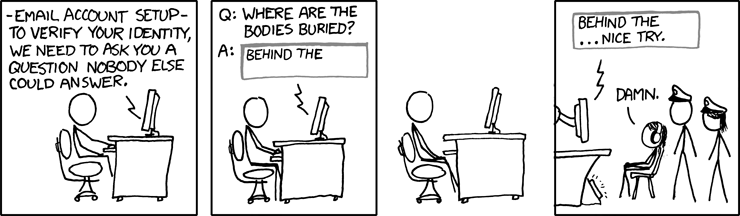
I thought the cartoon below from xkcd.com fit right in.
Subscribe to:
Posts (Atom)


 Posts

